Showing posts with label Mac. Show all posts

Tuesday, 19 November 2013

#Apple launches Macbook Pro laptops in India @ Rs 99,900

Apple launches Macbook Pro laptops in India @ Rs 99,900


Apple has launched its new range of Macbook Pro laptops in India, bringing its revamped product line to the country within a month of launch. The 13-inch model starts at Rs 99,900, while the 15-inch variant has been priced at Rs 1,49,000. 

At an event last month, Apple unveiled its next-generation 13-inch and 15-inch Macbook Pro models, alongside the new models of the popular iPad and iPad Mini tablet computers. Both the models will come preloaded with OS X Mavericks, the latest version of the company's operating system, and iLife software suite. 

The 13-inch Macbook Pro will run on the fourth-generation Intel Haswell chip and Iris GPU. The graphics of this machine are 90% faster than predecessors and it will offer battery life of nine hours, up from seven hours in the previous model. It is also thinner and lighter, while the flash storage and Wi-Fi are faster as well. 

The device has a Retina display and features dual-core Intel i5 processor with clock speeds of 2.4GHz and 2.6GHz. It is available in 128GB, 256GB and 512GB SSD versions, with options of 4GB and 8GB memory. This model has two Thunderbolt 2 ports, two USB 3.0 ports and one HDMI port and comes with a HD FaceTime camera. 

Apple's 15-inch Macbook Pro has the Intel i7 processor with clock speeds of 2GHz and 2.3GHz along with Iris Pro graphics. It comes in two variants -- 256GB SSD with 8GB RAM and 512GB SSD with 16GB RAM. The battery life of this laptop is eight hours and it will also come pre-installed with OSX Mavericks and iLife. 

The 13-inch MacBook Pro with 128GB SSD has been priced at Rs 99,900, while the 256GB version costs Rs 1,14,900. The model with 512GB SSD will hit the market at Rs 1,34,900. Apple's revamped 15-inch Macbook Pro with 256GB and 512GB storage options will cost Rs 1,49,900 and Rs 1,99,900, respectively. 

Earlier, taking a jibe at Microsoft's OEM partners, CEO Tim Cook called the competition "confused" and said they tried to make tablets into PCs and PCs into tablets and chased after netbooks. He reaffirmed the company's commitment to desktops and described how the new Mavericks OS update will improve performance and battery life.

Wednesday, 20 March 2013

How to Change the Location of Your iTunes iPhone Backups (Mac)

These are instructions on how to change the location that iTunes uses to backup your iPhone, iPad, or iPod touch for Mac.

Step One
Launch Terminal from your Applications:Utilities folder.


Step Two
Navigate to the MobileSync directory by inputting the following command and pressing Return.

cd ~/Library/Application Support/MobileSync


Step Three
Rename your old backup folder using the following command.

mv Backup Backup_Old


Step Four
If you haven't created a new folder to store your backups please do so now. You can do this with Terminal or Finder, or you can use an existing folder.

Example: mkdir /Volumes/Storage/iTunes/MobileSync/Backup

Step Five
Input the following command to create a symbolic link to your new folder.

ln -s /Volumes/Storage/iTunes/MobileSync/Backup ~/Library/Application Support/MobileSync


Step Six
You can use Finder to verify the symbolic link was created. Notice the arrow at the bottom left of the icon.


Step Seven
Test out the change by performing a backup with iTunes and verifying that your files are backed up to the new folder.

Friday, 15 March 2013

Apple Releases MacBook Pro Retina SMC Update v1.1

Apple has just released MacBook Pro Retina SMC Update v1.1, an update that fixes an issue with slow frame rates while playing games.

About MacBook Pro Retina SMC Update v1.1
This update resolves a rare issue where users may experience slow frame rates when playing graphics-intensive games on the 15-inch MacBook Pro with Retina Display. It also includes bug fixes for Power Nap, wake from sleep and fan control.

Boot ROM or SMC Version Information: After this update has successfully completed, your SMC Version will be: v 2.3f35

You can get the update from Software Update or at the link below...


Apple Releases New iMac With Built-in VESA Mount Adapter

Apple has released a new iMac with a built-in VESA Mount adapter.

The iMac with Built-in VESA Mount Adapter is ready to pair with your favorite VESA-compatible wall mount, desk mount, or articulating arm (sold separately). This iMac doesn't include a stand, so a mount is required. If you don't already have a mount, you can purchase one when you configure your iMac. 

The new iMac can be purchased at a $40 premium.


Apple Releases Mac OS X Mountain Lion 10.8.3 With Boot Camp Support for Windows 8

Apple has released Mac OS X Mountain Lion 10.8.3 which brings Boot Camp support for Windows 8.

OS X Update 10.8.3:
The 10.8.3 update is recommended for all OS X Mountain Lion users and includes features and fixes that improve the stability, compatibility, and security of your Mac, including the following:
● The ability to redeem iTunes gift cards in the Mac App Store using your Mac's built-in camera
● Boot Camp support for installing Windows 8
● Boot Camp support for Macs with a 3TB hard drive
● A fix for an issue that could cause a file URL to quit apps unexpectedly
● A fix for an issue that may cause Logic Pro to become unresponsive when using certain plug-ins
● A fix for an issue that causes audio to stutter on 2011 iMacs
● Includes Safari 6.0.3

You can get the update by selecting Software Update from the Apple Menu at the top left of your screen.


Sunday, 10 March 2013

How to Enable and Use Dictation in Mac OS X Mountain Lion


These are instructions on how to enable and use Dictation in Mac OS X Mountain Lion.

Step One
Select System Preferences from the Apple Menu at the top left of your screen.


Step Two
Click to select Dictation & Speech from the System Preferences menu.


Step Three
Click to choose the Dictation tab from the Dictation & Speech menu.


Step Four
Turn on Dictation by selecting the On radio button.


You'll be notified that when you dictate text what you say along with other information such as your contacts is sent to Apple. Click the Enable Dictation button to continue.


Step Five
Choose your audio input device from the dropdown located below the microphone icon. In this example we will use the MacBook Pro's internal microphone.


Step Six
Select a preferred shortcut that will be used to start a dictation from the Shortcut dropdown. In this example we will leave the shortcut as 'Press Fn (Function) Key Twice'.


Step Seven
Select your preferred language for dictation from the Language dropdown. Chinese, English, French, German, Italian, Japanese, Korean, and Spanish are supported.


USING DICTATION:
Navigate to the place where you'd like to dictate text and press the Fn key twice. Notice a microphone icon will appear. As you speak a purple audio level indicator will be displayed inside the icon. No text will appear while you are dictating. You may speak continuously for up to 30 seconds at a time.


When you have finished dictating, click the Done button below the microphone icon or press the Fn key. Your text will be uploaded to Apple for processing.


Once processed the microphone icon will disappear and your dictation will appear as text.


SHORTCUTS:
There are numerous shortcuts available to help improve your dictations. Some basic ones include 'all caps', 'new paragraph', 'new line', 'period', 'comma', 'question mark', 'quote', and 'end-quote'.

A full list of shortcuts can be found below...

question mark?
inverted question mark¿
exclamation point!
hyphen-
dash
em dash
underscore_
comma,
open parenthesis(
close parenthesis)
open square bracket[
close square bracket]
open brace{
close brace}
semi colon;
ellipsis
quote
end-quote
back quote"
single quote
end single quote
double-quote"
apostrophe'
colon:
slash/
back slash
tilde~
ampersand&
percent sign%
copyright sign©
registered sign®
section sign§
dollar sign$
cent sign¢
degree signยบ
caret^
at sign@
Pound sterling sign£
Yen sign¥
Euro sign
pound sign#
smiley face (or "smiley"):-)
frowny face (or "sad face", "frown"):-(
winky face (or "winky");-)
cap (for example, "this is a cap Test")Capitalize next word
all caps (for example, "this is a all caps TEST")Type in all caps
caps onCaps lock on
caps off (for example, "this is caps on A VERY IMPORTANT TEST caps off tomorrow")Caps lock off
no caps(for example, "what time is my meeting in no caps boston today")All lowercase
new lineInsert new text line
next lineGo to the next text line
new paragraphBegin new paragraph
next paragraphGo to the next paragraph
no spaceDo not insert a space after the next word
no space on (for example, "the new car is no space onreallyreallyexpensive")Do not insert any spaces between words
no space offResume inserting spaces between words
space bar (for example, "this restaurant is first space bar class")Type a space
numeral (for example, "he starts from position numeral 5")Type the numeral, such as 5 instead of "five"
Roman numeral (for example, "in January it's Roman numeral MMXIII")Type the spoken as a Roman number

Monday, 4 March 2013

New iMac Ship Times Improve to 1-3 Days

Apple is finally catching up to demand for its new iMacs with ship times improving to 1-3 days.

The desktop computer had been in limited supply since its launch with ship times reaching 3-4 weeks. 

Saturday, 23 February 2013

Retina MacBook Pro Benchmarks

Last week Apple quietly updated their Retina MacBook Pro lineup with faster processors. The 15-inch Retina MacBook Pro now comes with a 2.4 GHz, 2.7 GHz, or a 2.8 GHz quad-core processor. The 13-inch Retina MacBook Pro now comes with a 2.5 GHz, 2.6 GHz, 2.9 GHz, or 3.0 GHz dual-core processor.
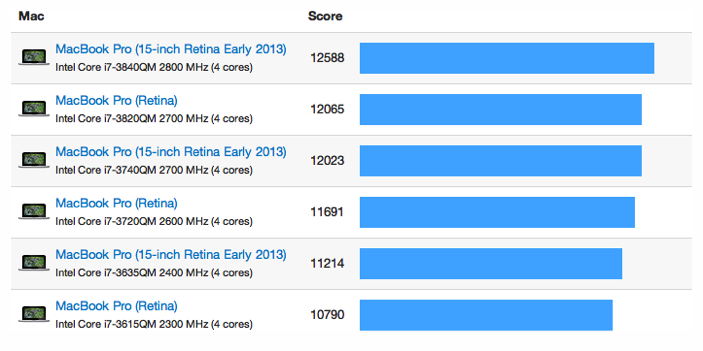
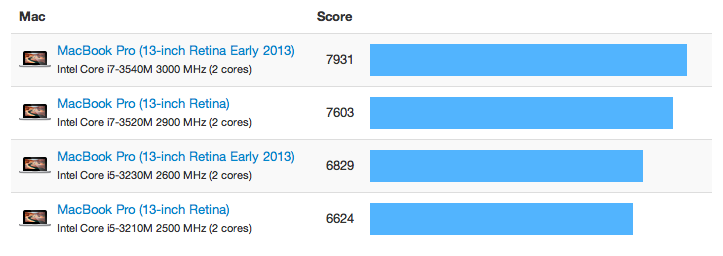
How do these new Retina MacBook Pro models perform compared to the original models? To find out I've collected Geekbench 2 results from the Geekbench Browser for all of the Retina MacBook Pro models and charted the scores below.
If you're not familiar with Geekbench, it's our cross-platform benchmark utility. Higher Geekbench scores are better, where twice the score means twice the performance. If you're curious how your computer compares, you can download Geekbench to find out.

15-inch Retina MacBook Pro

Below is a summary of the processor upgrades for the different 15-inch Retina MacBook Pro models:

15-inch Retina Mid 2012 15-inch Retina Early 2013
Low Core i7-3615QM @ 2.3 GHz Core i7-3635QM @ 2.4 GHz
Mid Core i7-3720QM @ 2.6 GHz Core i7-3740QM @ 2.7 GHz
High Core i7-3820QM @ 2.6 GHz Core i7-3840QM @ 2.7 GHz
Each model received a 100 MHz increase in processor speed. Besides the differences in speed, the processors for each model have the same specifications.
So, how do the new 15-inch MacBook Pros perform?
The new processors bring between a 3% to 5% increase in performance to each MacBook Pro model according to the Geekbench 2 scores. This increase is entirely due to, and in line with, the increase in processor speed.
One thing to note is that the new mid-range Retina MacBook Pro has the same speed processor as the old high-end Retina MacBook Pro. However, the new mid-range model is slightly slower than the old high-end model. While this seems surprising at first, the difference is easily explained by comparing the two processors: the old high-end processor has more cache than the new mid-range processor.

13-inch Retina MacBook Pro

Here is a summary of the processor upgrades for the different 13-inch Retina MacBook Pros:

13-inch Retina Late 2012 13-inch Retina Early 2013
Low Core i5-3210M @ 2.5 GHz Core i5-3230M @ 2.6 GHz
High Core i7-3520M @ 2.9 GHz Core i7-3540M @ 3.0 GHz
Like the 15-inch Retina MacBook Pro, each 13-inch Retina MacBook Pro model receives a 100 MHz increase in processor speed.
However, unlike the 15-inch Retina MacBook Pro, which only ships with the new processors, the 13-inch Retina MacBook Pro ships with both the old and the new processors. The old processors appear in 13-inch models that start with 128GB of storage, while the new processors appear in 13-inch models that start with 256GB of storage.
How do the new 13-inch MacBook Pros perform?
It turns out the new 13-inch MacBook Pros receive a boost similar to the new 15-inch MacBook Pros. The new processors bring a 3% to 5% increase in performance according to their Geekbench 2 scores. Again, this increase is in line with the increase in processor speed.

Final Thoughts

With Haswell, Intel's new processor architecture, at least four months away, I'm not surprised Apple updated the Retina MacBook Pro lineup with the latest Ivy Bridge processors. I am surprised Apple didn't update the MacBook Pro lineup at the same time. Both the 13-inch and 15-inch MacBook Pro come with the older Ivy Bridge processors (although you can upgrade the 15-inch MacBook Pro to the newer Ivy Bridge processors). I wonder if this is an indication that the Retina MacBook Pro is more popular than the MacBook Pro, or perhaps that this is the last generation of the MacBook Pro.

Apple may combine iPhone, iPad and Mac apps for a unified user experience

NEW DELHI:  Apple  might be planning to go the Microsoft way. The Cupertino-based tech firm is reportedly planning to unify its iOS and  Ma...